TikTok Video Downloader
By using our service you accept our Terms of Service and Privacy Policy.
SnapTik is a free TikTok video downloader that allows you to download TikTok videos without watermark in MP4 format and HD or Full HD quality. You don't need to install any application on your mobile or computer; you only need a TikTok video link, and we will do the rest. Using SnapTik, you can save videos to your device with just a single click.
SnapTik has made it easy for you. Just follow the steps below.
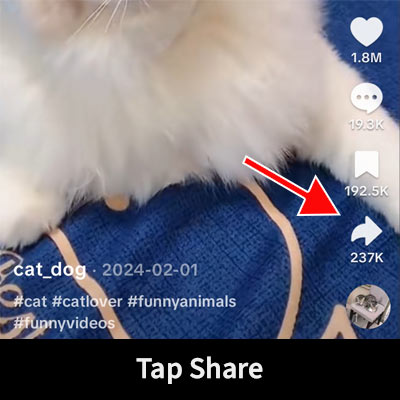
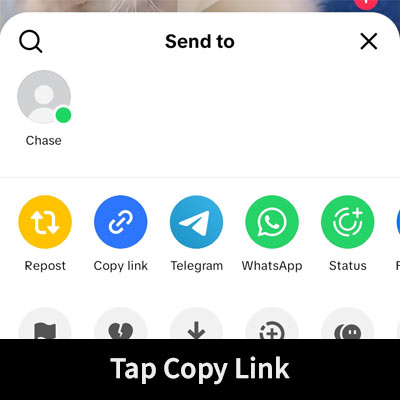
On the app, open your desired video, tap the Share button at the bottom right, and then tap the Copy Link option.
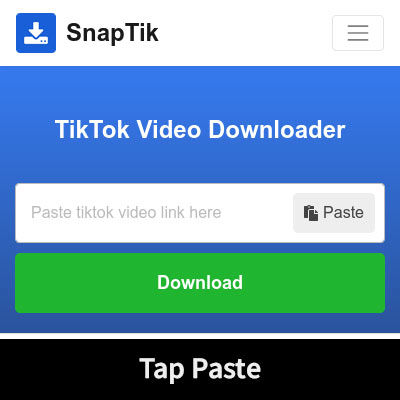
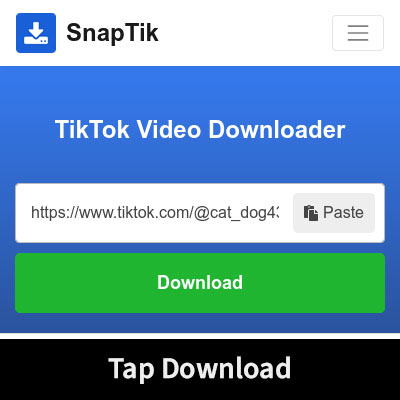
Return to the SnapTik website, paste the copied URL into the address field, and then tap the Download button.
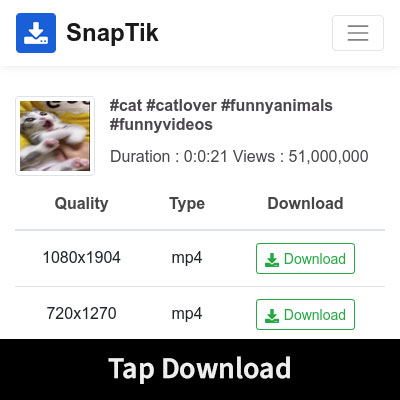
Wait while SnapTik processes the video. Choose the desired quality and download the video.
Note: Please use SnapTik only for content you own, have permission to save, or are legally allowed to download. Do not use this service to infringe copyrights, violate privacy rights, bypass platform rules, or redistribute content without authorization.
The following are the main strengths of SnapTik:
SnapTik offers a perfect opportunity to save videos without watermarks and in a clean format. It takes only a few simple clicks to get the video you want, without any watermarks or logos.
SnapTik offers its services completely free of charge. You also don't need to register or create an account. Moreover, you can use it indefinitely without encountering a usage limit message.
SnapTik’s other advantage is cross-device compatibility. SnapTik is a web-based tool that runs in a web browser (such as Google Chrome or Safari) and does not need to be installed. In other words, you can use SnapTik on your smartphone, PC, or tablet as it is highly compatible with all of them.
SnapTik is designed to be easy for everyone to use. It does not require an app installation and can be used right from your web browser. Just paste the link of the video you want in the download box (at the top of this page) and save the watermark-free version.
SnapTik lets you save videos in MP4 format. MP4 is a popular video format that is supported by most operating systems and video players. So you can easily watch downloaded videos on your mobile, computer, tablet, or smart TV.
You don't need to log in to TikTok or provide your TikTok username or password to use the downloader. You just paste the link to the TikTok video you want to download and select one of the available download options.
TikTok links can appear in different formats depending on whether you copy them from the app or a web browser. SnapTik can process supported TikTok video links and show the download options available for that video.
SnapTik might not be able to process a link if the video is private, deleted, restricted, or no longer available on TikTok.
Supported link formats:
Sometimes a TikTok video may not download even if the downloader is working fine. Check the common reasons below before trying again.
If none of these solutions work, please contact us through our Contact Us form. Include the video URL, the browser and device you are using, and a short description of what happens when you try to download the video. This information can help us investigate the problem.
If the original video was uploaded to TikTok in high quality, SnapTik can provide you with the available high-quality download, including HD or 4K, if that quality is available from the source. The download quality depends on the version of the video that TikTok makes available.
SnapTik does not artificially upscale low-quality videos to HD or 4K. If the original source is low resolution, the downloaded file will be of that source quality. The videos are in MP4 format and should play on most phones, tablets, computers, and other popular media players.
1. Open your desired video on the TikTok application, Tap on the Share button at the bottom right, and then tap on the Copy Link option.
2. Return to SnapTik website and paste the copied URL into the address field on the top of this page, and then click on the Download button.
3. Wait while SnapTik processes the video. Choose the desired quality and download the video.
TikTok videos are saved in the browser's default downloads folder. In the browser settings, you can see or change the default path of downloaded files.
1. Open your web browser, navigate to TikTok's official website, and go to the desired video.
2. Copy the video page URL from your web browser address bar.
3. Paste the copied link into the address field at the top of this page, then click on the Download button.
Yes, of course, SnapTik is completely free to use.
SnapTik does not keep a library of downloaded videos and does not store or archive user content under our Terms of Service. Technical website data may still be processed as described in our Privacy Policy.
1. Open the TikTok application.
2. Go to the desired video.
3. Tap the Share button, and tap on the Copy Link option in the opened box.
4. The video link has been saved to your clipboard.
5. Next, open your web browser and navigate to the website SnapTik.tech, paste the copied link into the address field.
Visual Guide:
No, you will not need to install any application or extension. We keep things easy for our users. Copy the video link and leave the rest to us!
No, there is no limit to the number of video downloads. At SnapTik, you can download as many videos as you like without any download limit.
No, we don't support this feature yet.
No, SnapTik does not support video editing. Download the video using SnapTik and then edit it with video editor apps.
No, SnapTik does not support MP3 downloads at this time. Videos are available for download in MP4 format.
Notice: SnapTik is an independent service. It is not affiliated with, authorized by, endorsed by, sponsored by, or officially connected with TikTok, ByteDance Ltd., or any of their affiliates. All trademarks, logos, and brand names are the property of their respective owners. Users are responsible for ensuring that they have the necessary rights or permissions before saving or using any content.