TikTok Story Viewer
By using our service you accept our Terms of Service and Privacy Policy.
TikTok Story Viewer by SnapTik is a free tool that allows you to view public TikTok stories anonymously and download them without watermark in MP4 format in HD or Full HD quality. You can use our TikTok Story Viewer on your mobile, tablet, or computer without installing any extra applications. Just enter the profile link in the input field and click the View button.
To view the stories of a profile anonymously, follow these steps:
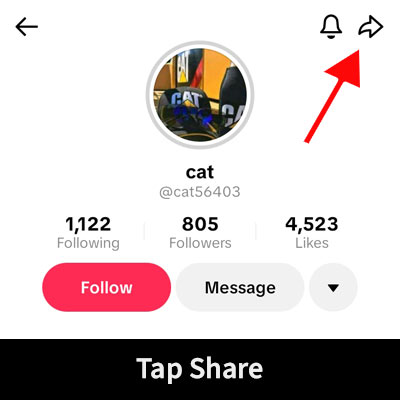
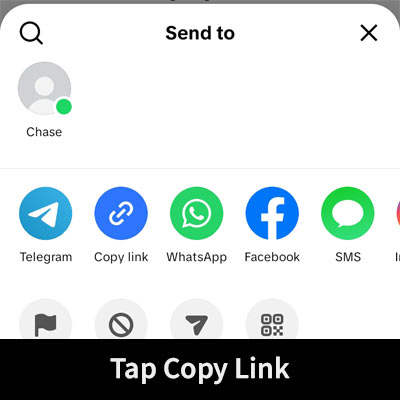
Go to your desired user profile. Tap the Share button and then select the Copy Link option.
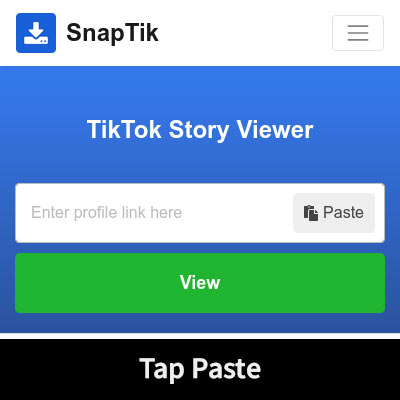
Return to this page, paste the copied link into the address field(at the top), and press the View button.
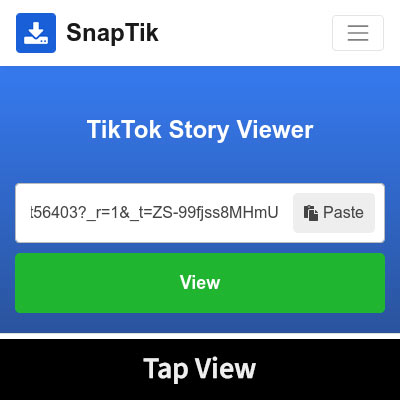
SnapTik will process the Link in seconds. Now, a list of user stories will be displayed. You can view them or download each one you want on your device.

SnapTik’s Story Viewer is a simple and fast method to view TikTok stories anonymously. Let’s take a look at some of its features and benefits:
Using Story Viewer you can view stories anonymously. In addition to viewing stories anonymously, it will allow you to save stories if required.
Story Viewer is an online tool that can be accessed with a web browser. Users don’t have to install anything on their device to use it. In addition, this feature is what makes it a cross-platform tool that can be used on a PC, smartphone, tablet, and laptop without any problem.
You do not have to log in to TikTok or provide your TikTok username or password to use Story Viewer. Simply copy and paste the link of the public TikTok profile whose available stories you want to view. Story Viewer runs directly in your web browser, so you don't have to install any third-party apps or browser extensions. That also means you don't have to grant extra permissions to apps on your device.
It is absolutely free; you do not need a subscription to use the service. We only place some ads on the site to be able to cover costs and develop services. You can also view the stories on as many profiles as you'd like because we have no usage limits.
Watching stories anonymously with SnapTik’s Story Viewer is very easy. No apps or browser extensions are required to be downloaded. Just enter the profile link; that’s it!
You can also save video stories as MP4 files using this tool. MP4 is widely supported by most modern devices and media players. Therefore, you can save video stories and enjoy watching them on your smartphone, tablet, PC, or smart TV without worrying about the video not playing.
Even when there is no problem with Story Viewer, a TikTok profile may sometimes not show any stories. See the common reasons below before trying again.
If none of these solutions work, please contact us via our Contact Us form. Include the TikTok profile URL, the browser and device you are using, and a brief description of the problem.
Story Viewer is designed to show available stories from public TikTok accounts. Paste a valid public profile link into the text box above, and SnapTik will show the available stories for that profile.
Story Viewer cannot access private, restricted, deleted, expired, or other non-public stories. It doesn't bypass TikTok privacy settings or provide access to content that is not publicly available.
1. Go to your desired user profile. Tap the Share button and select Copy Link.
2. Open your web browser, navigate to https://snaptik.tech website, and click on the "Story Viewer" option located in the header. Paste the copied link into the address field and tap on the "View" button.
3. After a while, a list of user stories will be displayed; you can see them or download each one you want on your device.
TikTok stories will saved in your browser's default downloads folder. In the browser settings, you can see or change the default path of downloaded files.
If you know the username of the TikTok user you want, just enter it in the address field at the top of the page and click on the "View" button. Otherwise, you need to follow these steps.
1. Open your browser and go to the official Tiktok website at tiktok.com .
2. Search for the user you want in the search field at the top of the TikTok website. After finding the desired user in the results list, click on his name to enter the user's profile page.
3. Click the "Share" button and select the "Copy Link" option.
4. Go back to this page, enter the copied link in the address field, and finally click on the "View" button.
Yes, of course, this tool is fully free and unlimited.
SnapTik does not save downloaded stories and does not retain or archive any user content under our Terms of Service. Technical website data may still be processed as outlined in our Privacy Policy.
No, this tool can only be used to view the stories of public TikTok accounts. The story viewer tool does not support private, restricted, login-only, or otherwise non-public content.
Yes, The Story Viewer tool allows users to view stories as well as save them. You can view all the active stories of a user and save any of them.
Notice: SnapTik is an independent service. It is not affiliated with, authorized by, endorsed by, sponsored by, or officially connected with TikTok, ByteDance Ltd., or any of their affiliates. All trademarks, logos, and brand names are the property of their respective owners. Users are responsible for ensuring that they have the necessary rights or permissions before saving or using any content.